Overview
The headless/core/service-core library is a crucial component of the JMC framework, providing the groundwork for defining Microservices that encapsulate the business logic of the application. Each module specifies one or more REST services, which, in turn, define one or more Endpoints—fundamental building blocks within the JMC framework.
While the majority of endpoints are exposed as REST services, the default invocation strategy results in a local call.
Service invocations adhere to standard JSON REST services and can be conceptualized as akin to a Spring @RestController with additional routing in place. Instead of a single class managing all the web methods for a specific service, openpos-service routes and delegates each web service method to its own class for processing.
The services are intentionally designed to be stateless. Therefore, any necessary context should be conveyed with each service method invocation.
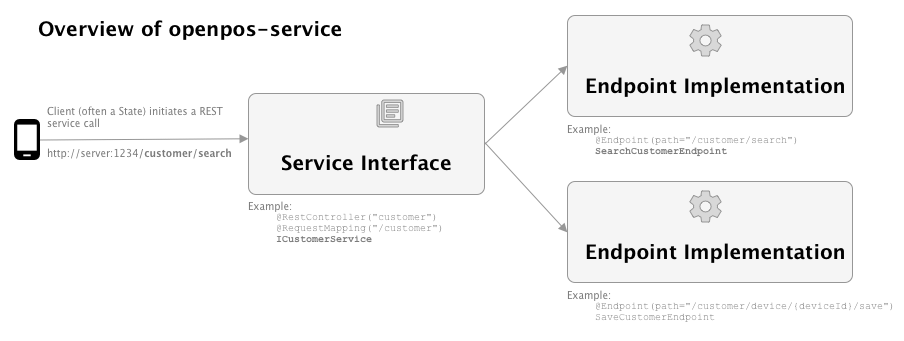
These are the main components of a Microservice:
- A module is defined. A module is usually a java project with a dependency on at least core/service-core. (e.g. CustomerModule)
- A module contains one or more Rest Service Interfaces. The Service Interface is a Java interface which defines the possible Rest URL patterns handled, and maps them to Java method contracts. (ICustomerService)
- There should be one endpoint implementation provide for each method declared in the Service Interface. The Endpoint implementation provides the concrete logic for each service method. (SearchCustomerEndpoint)
The flow of a service invocation is this: * The Spring rest controller receives the rest request and forwards it to a (generated) implementation of the Service Interface (e.g. ICustomerService) * The EndpointDispatchInvocationHandler forwards the rest service request to the correct @Endpoint implementation (e.g. SearchCustomerEndpoint) * The endpoint receives the request and repsonds to it and Spring translates that result back into JSON for the REST response.
Key Classes
- AbstractModule: base class for all Module declaration classes. The Module declaration defines things like the module name, version, table prefix, and local SQL datasource.
- @Endpoint: Annotation that marks a class as an endpoint. An endpoint implements one service method (e.g. "searchCustomer") as part of a larger rest service.
Modules
How to add a new module
Each module should be a separate Java project which depends on openpos-service.
A module starts with the module declaration class, which is a subclass of AbstractModule. Spring is used to discover and configure the module declarations.
@Configuration("CustomerModule")
@EnableTransactionManagement
@Conditional(ModuleEnabledCondition.class)
@Order(10)
public class CustomerModule extends AbstractModule {
    @Override
    @Bean(name = NAME + "DataSource")
    protected DataSource dataSource() {
        return super.dataSource();
    }

    @Override
    @Bean(name = NAME + "SessionFactory")
    protected DBSessionFactory sessionFactory() {
        return super.sessionFactory();
    }

    @Override
    @Bean(name = NAME + "Session")
    protected DBSession session() {
        return super.session();
    }
    @Bean
    protected ICustomerService customerService() {
        return buildService(ICustomerService.class);
    }
- The Service Interface is backed by one or more @Endpoint implementations. In this example, the Service Interface of ICustomerService looks like this:
@Api(tags = "Customer Service", description = "This service exposes endpoints to retrieve customer information")
@RestController("customer")
@RequestMapping("/customer")
public interface ICustomerService {

    @RequestMapping(path="/search", method=RequestMethod.POST)
    @ResponseBody
    public SearchCustomerResult searchCustomer(@RequestBody SearchCustomerRequest request);

    @RequestMapping(value="/device/{deviceId}/save", method=RequestMethod.POST)
    public CustomerModel saveCustomer(@PathVariable("deviceId") String deviceId, @RequestBody CustomerModel customer);
}
Description of the annotations: * @Schema is used by swagger to generate documentation and a Rest service test page. * @RestController (Spring) makes this a Spring bean. * @RequestMapping (Spring) maps all method in this Service Interface under the URL path of "/customer" * @RequestMapping (Spring) is the standard Spring annotation to map a method to a more specific part of the REST URL and to an HTTP method. * @ResponseBody (Spring) indicates that the method return value should be mapped to the web response body (in this case, as JSON)
This example has two methods, searchCustomer and saveCustomer. So it will require two @Endpoint implementations.
@Endpoint(path="/customer/search")
@Transactional(transactionManager=CustomerModule.NAME + "TxManager")
public class SearchCustomerEndpoint {

    @Autowired
    private CustomerRepository customerRepository;

    public SearchCustomerResult searchCustomer(SearchCustomerRequest request) {
        return new SearchCustomerResult(customerRepository.search(request.getCriteria()));
    }
}
@Endpoint(path="/customer/device/{deviceId}/save")
@Transactional(transactionManager = CustomerModule.NAME + "TxManager")
public class SaveCustomerEndpoint {

    @Autowired
    CustomerRepository customerRepository;

    @Autowired
    IContextService contextService;

    public CustomerModel saveCustomer(String deviceId, CustomerModel customer) {
        // details omitted
        customerRepository.save(customer);
        return customer;
    }
Notes on Endpoint implementations: * The name of the Endpoint class should also be the method name + Endpoint. So in the case of the "searchCustomer" method, we have a SearchCustomerEndpoint. This is a convention and not technically used by the framework. * Endpoints are discovered by declaring the @Endpoint annotation. They are matched up and selected based on the path in the Endpoint annotation. So in the example above, the Endpoint paths are a concatenation of the @RestController path and the @RequestMapping path.
How to add a new service method
For an existing module, there are just two steps for adding a new service method.
1) Declare the new service method on your service interface, with the proper Rest mappings. E.g. maybe we want to add a "forgetCustomer" service for a customer who wishes for their personal data to be removed from the system. In ICustomerService, we would add a method declaration:
@RequestMapping(value="/device/{deviceId}/forget", method=RequestMethod.POST)
    public CustomerModel forgetCustomer(@PathVariable("deviceId") String deviceId, @RequestBody CustomerModel customer);
2) Then, in the customer-module, add a new @Endpoint implementation for the service method. Since the method is called "forgetCustomer", the new @Endpoint should be called ForgetCustomerEndpoint.
@Endpoint(path="/customer/forget")
@Transactional(transactionManager=CustomerModule.NAME + "TxManager")
public class ForgetCustomerEndpoint {

    @Autowired
    private CustomerRepository customerRepository;

    public ForgetCustomerResult forgetCustomer(SearchCustomerRequest request) {
        // implementation here
    }
}
How to add new implementations of existing service methods
For a module that already has a breadth of existing service methods, it may make more sense to add an additional implementation of that particular module rather than adding an additional set of service methods.
For example, let's consider a situation where we're integrating support for a new payment provider into our existing payment module. This new provider, Adyen, has a "Purchase" call to transact funds - which differs from our existing provider, NCR. They have an "Authorize" call to transact funds, and the two call differ slightly in both request format and the requisite information. While it may initially seem reasonable to add new service methods to account for additional payment providers in PaymentService module, this is probably not sustainable:
@Api(tags = "Payment Service", description = "This service exposes endpoints related to handling of payments")
@RestController("pay")
@RequestMapping(REST_API_CONTEXT_PATH + "/pay")
public interface IPaymentService {

    /**
     * Authorize an NCR payment
     */
    @RequestMapping(value = "/authorizeNcr", method = RequestMethod.POST)
    @ResponseBody
    public AuthorizationResponse authorizeNcr(@RequestBody AuthorizationRequest request);

    /**
     * Authorize an Adyen payment
     */
    @RequestMapping(value = "/purchaseAdyen", method = RequestMethod.POST)
    @ResponseBody
    public AuthorizationResponse purchaseAdyen(@RequestBody AuthorizationRequest request);

}
{
@Endpoint(path = REST_API_CONTEXT_PATH + "/pay/authorizeNcr")
public class NCRAuthorizationEndpoint {

    public AuthorizationResponse authorizeNcr(AuthorizationRequest request) {
        //NCR-specific logic
    }

}
{
@Endpoint(path = REST_API_CONTEXT_PATH + "/pay/purchaseAdyen")
public class AdyenPurchaseEndpoint {

    public AuthorizationResponse purchaseAdyen(AuthorizationRequest request) {
        //Adyen-specific logic
    }

}
We're not really leveraging the power of these microservices if we do it this way. This could quickly balloon as more payment provider implementations are brought on, and calls within the POS will need to manually sift through these methods to find the correct payment provider's implementation of a particular operation. Further, each provider will most likely differ between not just the transact funds operation, but nearly all other operations as well.
A better solution in this case may be to provide an additional implementation of the payment service module.
To do this, we can simply add an implementation tag to our existing NCRAuthorizationEndpoint's header:
@Endpoint(path = REST_API_CONTEXT_PATH + "/pay/authorizeNcr", implementation = "ncr")
public class NCRAuthorizationEndpoint {
We can do the same to our new Adyen endpoint:
@Endpoint(path = REST_API_CONTEXT_PATH + "/pay/purchaseAdyen", implementation = "adyen")
public class AdyenPurchaseEndpoint {
And now, we can simplify our Payment module service methods to just one, general, authorize call on the same path:
@Api(tags = "Payment Service", description = "This service exposes endpoints related to handling of payments")
@RestController("pay")
@RequestMapping(REST_API_CONTEXT_PATH + "/pay")
public interface IPaymentService {

    /**
     * Authorize a payment
     */
    @RequestMapping(value = "/authorize", method = RequestMethod.POST)
    @ResponseBody
    public AuthorizationResponse authorize(@RequestBody AuthorizationRequest request);

}
{
@Endpoint(path = REST_API_CONTEXT_PATH + "/pay/authorize", implementation = "ncr")
public class NCRAuthorizationEndpoint {

    public AuthorizationResponse authorize(AuthorizationRequest request) {
        //NCR-specific logic
    }

}
{
@Endpoint(path = REST_API_CONTEXT_PATH + "/pay/authorize", implementation = "adyen")
public class AdyenAuthorizationEndpoint {

    public AuthorizationResponse authorize(AuthorizationRequest request) {
        //Adyen-specific logic
    }

}
Now, whenever the POS makes a call to the payment module's authorize() method, Spring will automatically route us to the appropriate endpoint for our specified implementation of the payment module.
This is controlled by the openpos.services.specificConfig.pay.implementation config parameter. pay here will differ between modules. So for example, the user service would be configured with openpos.services.specificConfig.user.implementation
For Adyen, we would set openpos.services.specificConfig.pay.implementation=adyen
For NCR, we would set openpos.services.specificConfig.pay.implementation=ncr
We can continue this implementation and do the same for any number of other payment module service methods, and provide a single point of control for switching over the entire POS to a particular payment provider. This gives us a seamless, payment-provider-agnostic way to complete payments.
NOTE: If an implementation tag is not provided on an endpoint, it is assumed to be "default". "default" implementations will always* load if no other implementations of that service method exist.
Repositories and Persistence
Normally a module will declare a DBSessionFactory and DBSession in its module declaration class. This makes it natural to write one or more repository classes. Any logic that saves or retrieves data should be placed in a repository class. The repository class should expose a clean API to the service which does not suggest what persistence technology it is using to save or retrieve the data.
CustomerRepository Example
@Repository
public class CustomerRepository {

    @Autowired
    @Qualifier(CustomerModule.NAME + "Session")
    @Lazy
    private DBSession dbSession;


    public List<CustomerModel> search(SearchCriteria criteria) {
        String sqlName = "searchCustomer";
        if (criteria.contains("phoneNumber")) {
            sqlName = "searchCustomerByPhone";
        } else if (criteria.contains("email")) {
            sqlName = "searchCustomerByEmail";
        } else if (criteria.contains("zip")) {
            sqlName = "searchCustomerByZip";
        }
        Query<String> searchCustomerQuery = new Query<String>().named(sqlName).result(String.class).useAnd(criteria.isUseAnd());
        List<String> customerIds = dbSession.query(searchCustomerQuery, criteria.getCriteria());
        List<CustomerModel> customers = new ArrayList<>();
        for (String customerId : customerIds) {
            CustomerModel model = find(customerId);
            customers.add(model);
        }
        return customers;
    }
    ...
In this example, the CustomerRepository is a normal Spring bean, annotated with @Repository. The DBSession here comes from openpos-persist, and provides the openpos framework's view of an open relational database connection.
For details on DBSession, Query, etc. see the documentation on openpos-persist.
Local vs. Remote Service Calls
Each service method can be configured to make a local or remote call. For example, when looking up an item, maybe you really just want the server to check the store database. But when looking up a customer (who may have signed up at a different store), you will also want to check the central office server.
Whether a service or method is local or remote is determined by the presence of EndpointSpecificConfig. A mapping is typically built up in the Spring loaded application.yml file, similar to this:
  services:
    commonConfig:
      remote:
         httpTimeout: 30
         url: 'http://localhost:6142'
    specificConfig:
      pay:
        strategy: LOCAL_ONLY
        implementation: simulated
      admin:
        profile: remote
        strategy: REMOTE_ONLY
      item:
        profile: local
      customer:
        profile: remote
        strategy: REMOTE_FIRST
      returnsmgmt:
        profile: remote
        strategy: REMOTE_FIRST
Client Context
Whenever an Action request originates from a client device a context object is created and made available to operations resulting from the request. An example of this context information would be Device ID of the client making the request.
The context information can be access by injecting the ClientContext object and accessing the property by name.
    @Autowired
    ClientContext clientContext;
When accessing this context information from and endpoint implementation @ClientContextProperty can be used to inject just the property.
    @ClientContextProperty
    private String deviceId;
The ClientContext is pass along with the request when making Remote service calls, which makes the context available on the remote service endpoint implementations as well.
Configuration
What properties are available in the ClientContext are configurable at an application level using the following configuration.
ui:
    client-context:
      parameters:
        - deviceId
        - timezoneOffset
The list of parameters determines what values to pull from the subscription request and add to the context object.
Service Endpoint Statistic Logging
In order to start sampling endpoints and logging statistics, yaml configurations need to be set in the 'application.yml'. Every module and endpoint can optionally have a samplingConfig section for that level. To turn on sampling for an endpoint, a samplingConfig section will need to be created at the module and endpoint levels with enabled set to true. Optionally, in each section, a number for retention days can be set to specify how long logs should be retained for.
For example, a module section may look like the following.
openpos:
  service:
    specificConfig:
      customer:
        samplingConfig:
          enabled: true
          retentionDays: 4
        profileIds:
          - local
        strategy: LOCAL_ONLY
        endpoints:
          - path: /customer/customergroups
            profile:
            strategy: LOCAL_ONLY
            samplingConfig:
                enabled: true
          - path: /customer/detailed
            profile:
            strategy: LOCAL_ONLY
            samplingConfig:
              enabled: true
Database Overriding
Sampling configurations can also be overridden by entries in the CTX_CONFIG table. In order to override values using this method three columns are important. - CONFIG_NAME column requires the yaml key leading to the desired configuration. For example, "openpos.services.specificConfig.customer.samplingConfig.enabled". - CONFIG_VALUE specifies the value that should be set in the location specified by CONFIG_NAME. - ENABLED will specify if this rows configuration should be used.