Cash Up/Down
The ability to add or remove cash from an active till is controlled by the Cash Up and Cash Down found on the Manage Screen options.
Concepts
A feature to monitor and control the physical amount of cash in the till, the system can be configured to notify the cashier that money needs to be removed or added.
The amount that triggers these alerts and the reason codes presented are all configurable.
Also, the Cash Up / Down can be run at anytime regardless of any set notifications.
Cash Up
You begin your till session with, for example, $200. You have set a threshold, for example, of $50 to notify the cashier there is a shortage of funds in the till, and they should do a Cash Up to increase the balance.
The Cash Up Process
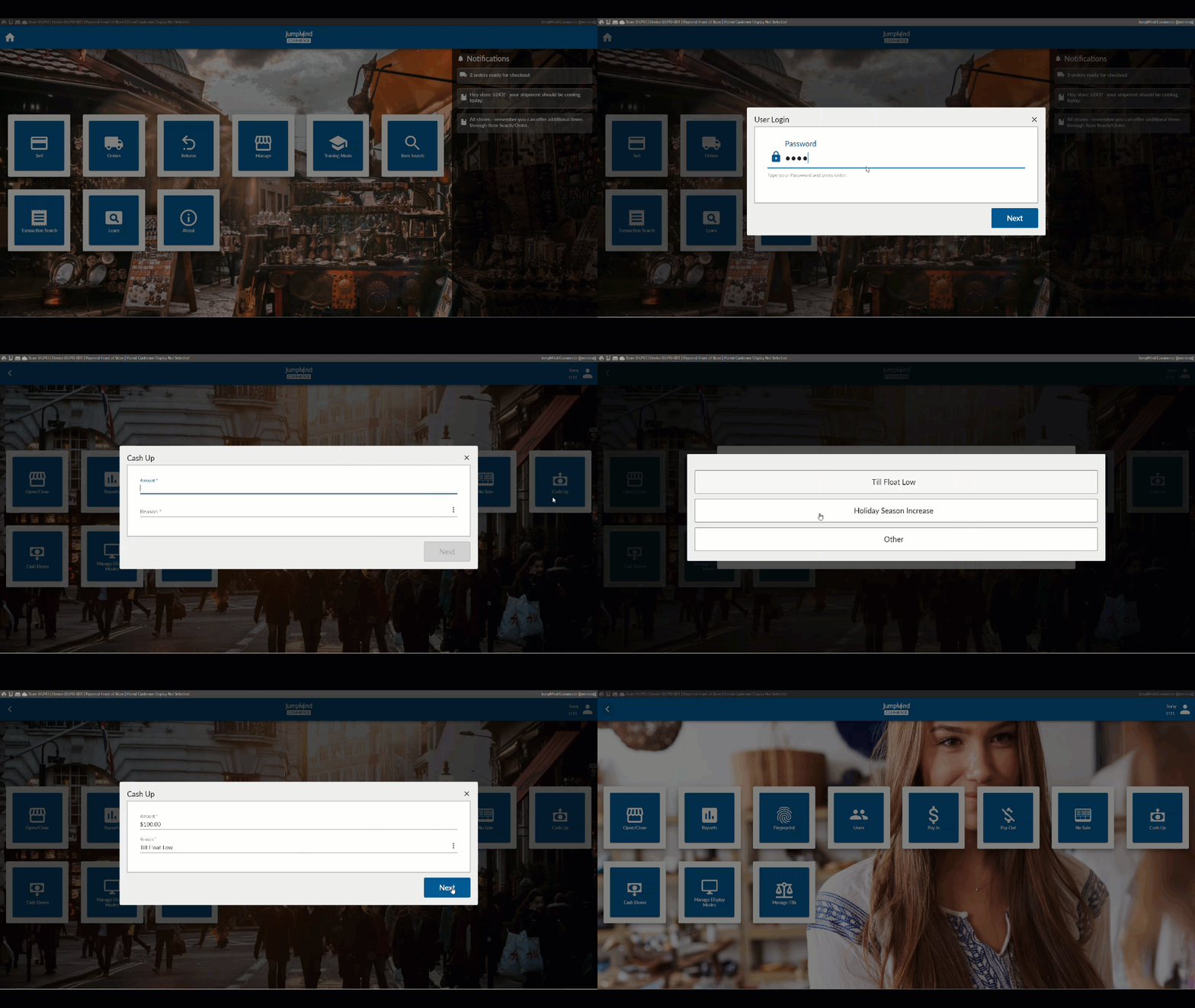
Cash Down
Say you wish to do a mid-day deposit. You begin your till session with, for example, $200. Your cash grows to to $625.00 by 3:00PM, you can do a Cash Down to decrease by $425.
You can also set a system threshold, for example, to $500 to notify the cashier that there is an excess of funds in the till, and they should do a Cash Down to decrease the balance as soon as that condition exists.
The Cash Down Process

These actions will reflect on the till reports and in the Electronic Journal.
Configuration Options
| Action | Field | Option |
|---|---|---|
| Dollar amount minimum that till can hold before it needs to be Cashed Up | minThreshold | ex. 50 |
| Dollar amount maximum that till can hold before it needs to be Cashed Down | maxThreshold | ex. 500 |
| If a pickup amount is suggested | suggestPickupAmount | True/False |
| The suggested pickup amount is rounded | roundSuggestedPickup | True/False |
| Suggested pickup round amount | suggestedPickupRoundAmount | ex. 100 |
| Is the pick up reason code displayed | pickupReasonEnabled | True/False |