SSL
SSL
Windows Key Store
Windows 10 (& 11) have Certificate Key Stores: One global Key Store Java calls Windows-MY-LOCALMACHINE, and a key store for every user account Java knows as Windows-MY-CURRENTUSER. For versions of the OpenJDK prior to 11.0.18, the Java Runtime Library could only access the current user's key store accessible by the name Windows-MY. After 11.0.18 Windows-MY still works but Windows-MY-CURRENTUSER is preferred.
The OpenJDK issue opened to address enabling Java access to the global key store is https://bugs.openjdk.org/browse/JDK-6782021. The OpenJDK 11 backport issue is https://bugs.openjdk.org/browse/JDK-8293440
The OpenJDK commit that added this capability to Java 11 is https://github.com/openjdk/jdk11u-dev/commit/f75b74d19e84ac802913d3ee8ba033663b0f17ae.
Import Certificates using Windows
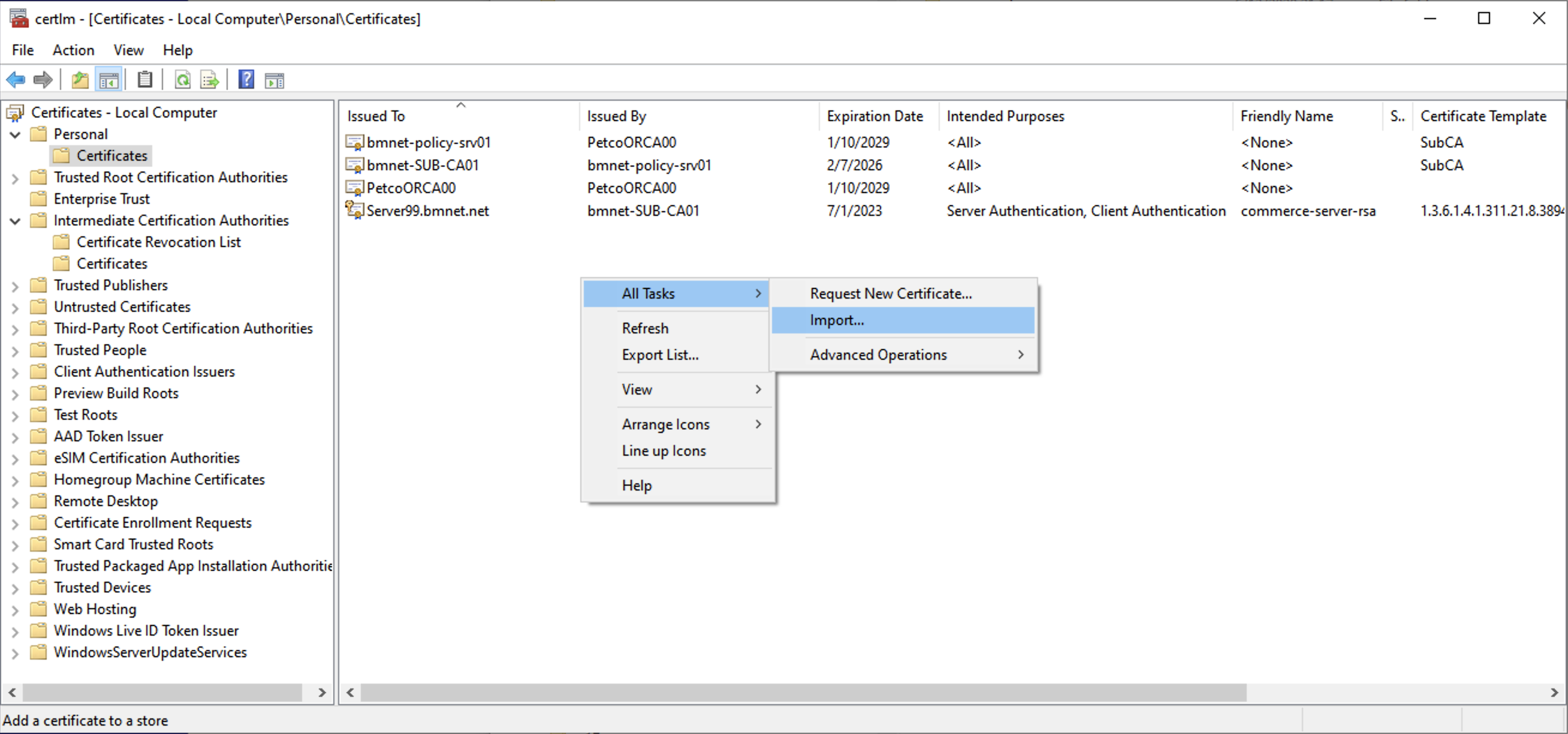
Two different apps are available to import certificates and view them: certlm.msc (as in local machine) and certmgr.msc for current user.
It may not be possible to import certificates and view them using certmgr for pseudo accounts like SYSTEM.
If you have a personal information exchange formatted file (.pxf) Windows can import this directly.
Install the certificate in the Windows key store Windows-MY-LOCALMACHINE. The certAlias value must correspond with the Windows certificate's Friendly Name attribute. For the example below, the certificate friendly name should be commerce-server-rsa. keyStorePath, keyStorePasswordEnvName, and trustStorePasswordEnvName should be blank.
Import Certificates using Keytool
The keytool command can import X.509 v1, v2, and v3 certificates, and PKCS#7 formatted certificate chains consisting of certificates of that type.
The data to be imported must be provided either in binary encoding format or in printable encoding format (also known as Base64 encoding) as defined
by the Internet RFC 1421 standard. In the latter case, the encoding must be bounded at the beginning by a string that starts with -----BEGIN, and
bounded at the end by a string that starts with -----END.
If you have a certificate in personal information exchange format (.pfx), convert it to one of the supported formats using openssl commands.
Import a certificate into Windows (be sure to use keytool installed with Java 11.0.18+)
keytool -importcert -providername SunMSCAPI -storetype Windows-MY-LOCALMACHINE -alias commerce-server-rsa -file <path-to-cert>/cert-filename
(omitting -keystore and -storepass as they are not applicable with Windows, although you might need to be running Git Bash/CMD/PowerShell as Administrator)
Configuring Commerce to serve https using certificates from the Windows key store
---
secured:
  certAlias: commerce-server-rsa
  keyStorePath:
  keyStoreType: Windows-MY-LOCALMACHINE
  keyStorePasswordEnvName:
  keyStoreCreateIfNotExists: false
  keyStoreSecurityProvider: SunMSCAPI
  trustStoreType: Windows-ROOT-LOCALMACHINE
  trustStorePasswordEnvName: