Daily Opening / Closing
At the beginning of each business day, the cashier (with proper authorization) will need to go through the process of opening the store. The process will open the store, the specific devices, and then activate the till that will be used for those devices.
Concepts
- Ability to open/close store is driven by role authorization.
- Auto open of store??
- Auto closing of store?
- Notify that all end of day activity has been completed?
- Notify that second end of day has already been preformed?
- System will alert if business day does not match the current day (probably not closed yesterday).
- Does the system record number of times tender report is run?
- The system does auto produce the closing report.
Store Safe
For a point of sale system, the store safe is the term for the virtual holding place for the total cash on hand at the location. Tills are the cash drawers created by the transfer of the money from the store safe. These tills are then assigned to the store's checkout devices.
Open Store
Process to open the store involves opening the store, the device and then assigning a till to the device.
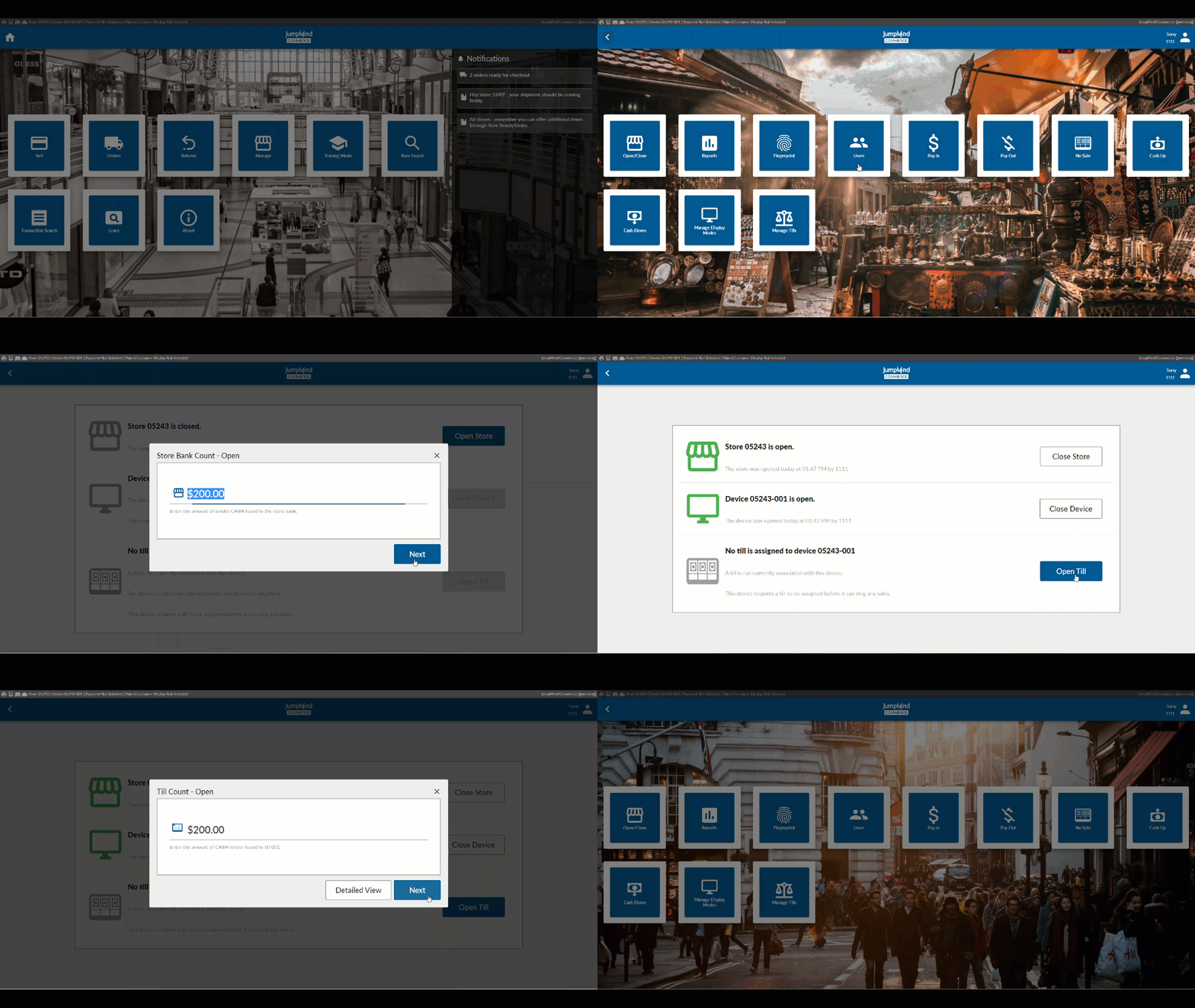
The store is now open and the device is ready for sales transactions.
Close Store
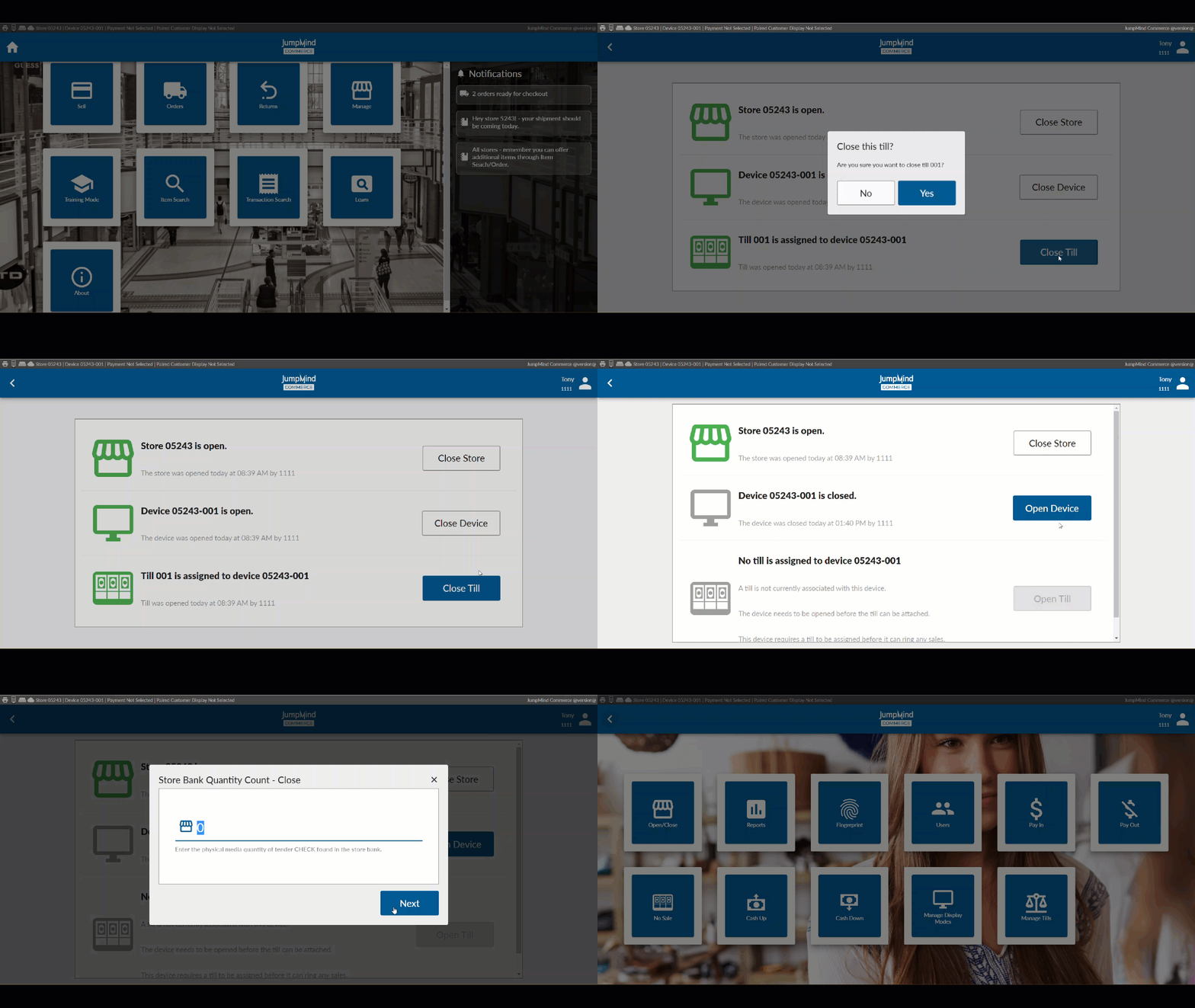
At the conclusion of the business day, the store needs to be closed by the manager (or person with the required security).
The closing of the store can only happen once any open tills are reconciled and open devices are closed.
NOTE: If the store is not closed properly, at the end of the day, there is a chance the store could pick up and continue to ring sales under the previous business day's date.
The sequence is the tills need to be closed and reconciled; close the device(s) and then the store.
Configuration Options
| Action | Field | Option |
|---|---|---|
| Must the device be open by the end of user prior to using it | deviceOpenRequired | True/False |
| Auto open the store if it's not open | autoOpenStore | True/False |
| The store has a store safe that requires to be reconciled | storeBankEnabled | True/False |
| The expected store safe is blind to the user | storeBankBlindFloat | True/False |
| The expected store safe tender quantity is blind to user | storeBankBlindQuantity | True/False |
| The store has constraints on days that be used to open store | storeOpenDateRestrictionsEnabled | True/False |
| A confirmation for till amounts is needed to continue closing store bank | storeBankCloseConfirmTillCountsEnabled | True/False |
| A confirmation for store bank counts is needed to complete closing bank | storeBankCloseConfirmStoreBankCountsEnabled | True/False |
| Can open devices be auto closed at store closing | autoCloseOpenDevices | True/False |
| Can store close with suspended transactions | isTransactionSuspensionRestrictionEnabled | True/False |
| Can suspended transactions be auto cancelled during store closing | autoCancelSuspendedTrans | True/False |
| Action taken if store cannot close with suspended transactions | closeStoreSuspendedTransAction | REVIEW_TRANS |
| Message will appear if business date does not match system date | showBusinessDateToast | True/False |
| Is business date error message persistant | businessDateToastPersistent | True/False |
| Can you open a device if the till is closed | openCashDrawerOnCloseTill | True/False |